
We needed to find a plumber this week because there were leaked phones all over the place – we saw spy shots of multiple Windows Phone 7 devices and Android handsets. If that wasn’t enough, we got some hands-on time with some cool new apps and hardware, Froyo is finally getting out there en masse and more.
Say hello to Windows Phone 7 devices

We had a few Microsoft Windows Phone 7 handsets show their shiny faces this week and the most interesting one, to me, is the HTC T8788 above. It looks like the typical high-end quality you expect from an HTC device except there’s a slide-out speaker. Umm, I’m not sure how useful that will truly be but at least the phone looks nice.
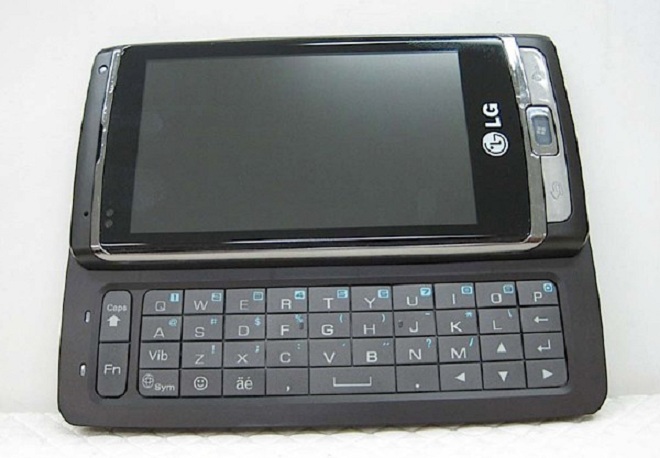
The LG GW910 also showed up this week thanks to the Federal Communications Commission and it looks like a solid handset but not a superb one. Still, with both this and the HTC device above, the hardware just needs to be pretty good, as I’m really looking forward to how Windows Phone 7 works in the real world. We should know pretty soon, folks.
The next generation of Android, again

It seems like every week we spy new Android handsets on the horizon and this week was no different as we saw the whole range. The Samsung Tab (above) was teased this week and it sports a 7-inch touch screen, Android 2.1, 3G, WiFi and all the goodies you’d expect from a high-end device. This is going to get a big unveiling at next week’s IFA show and we’ll be there to capture every glorious moment.

Well, what do we have here? This monster HTC Android device showed up Friday and it looks like a cool superphone for Verizon Wireless. There’s not much known but this device will have a 4.3-inch screen, a kickstand, 8-megapixel camera and Android. I think of this as an EVO 4G minus the 4G – could this possibly be the “Merge” we’ve heard floating around?

Rounding out the leaked Android list this week is the Motorola Kobe, a mid-range device that will have MotoBlur. It looks like it will launch with 2.1 but it should be quickly updated to Froyo, although Motorola hasn’t been that good with its non-Droid lineup when it comes to software updates.
Android beefs up with Flash, Froyo

The Android platform just got a bit better this week for multiple devices as over-the-air upgrades have added new functionality. Verizon is pushing out an update for the Motorola Droid which will enable users to get Adobe Flash Player 10.1. The update doesn’t have the Flash Player but it enables you to download it from the Android Market.
Verizon was busy, as it also pushed out the much-awaited Android 2.2 upgrade for the Droid Incredible. This means Incredible users can now have access to tethering, mobile hotspot, improved browsing and performance and a whole lot more. Get downloading, friends.
HTC Desire hands-on

Our lovely Simon got his hands on the HTC Desire and it’s been fun to watch a die-hard BlackBerry fan get a full taste of Android with HTC Sense goodness. He’s still cranking out a full review, but he was pretty smitten, judging by his initial impressions.
As for my impressions of the HTC Desire so far, I’ve become instantly enamoured with the phone. Maybe I’ve just been overly deprived of Googly goodness in my BlackBerry box, but everything is snappy, the screen is crisp, the build quality is tight and solid. I’ve been using Scenes a lot to offer custom-tailored home screen layouts depending on what I’m doing.
Check out the unboxing videos for some more details.
Cool app of the week

Ok, I’m cheating here a little bit because this isn’t necessarily an app but the new tech in Ford’s upcoming lineup is so cool that I wanted to give it another shout out. We got a chance to play with the MyFord Touch system and it is some cool stuff.
Assuming you’ve already paired your phone with the MyFord Touch system, getting connected to you car is as simple as opening the door and stepping inside. The car will automatically pair with your phone and sync with its phonebook. You can also set the system to stream music from your mobile phone over Bluetooth. Or, you can simply plug a USB flash drive loaded with MP3s into one of the under-armrest USB ports or connect your media player via RCA cables. I found it easiest to connect my iPhone to handle all media playback, phone calls, and data services via Bluetooth. I decided to charge my iPhone via the cigarette lighter underneath the center stack, but I could have also charged via the USB port underneath the armrest.
Read the rest of this post to get a thorough take on the new tech. If you have any interest in cars whatsoever, you should have already clicked the link.
‘To Start Press Any Key’. Where’s the ANY key?

Holy heck, this was a busy week and next week is going to be even more jam-packed with stuff. We’ll be coming to you live from IFA with all the tablet scoops and I have a mighty fine surprise heading my way on Monday that I’ll be able to share with you this time next week. Follow us on Twitter (@intomobile) and on Facebook. Thanks for reading.
Witty quip.
(photo)