Holiday Gift Guide »

Samsung Galaxy Note updated with better keyboard, torch widget, brightness and lockscreen tweaks

Categories: Android, Devices, Samsung
By: , IntoMobile
Friday, January 20th, 2012 at 4:52 AM

Samsung launched a new software update for its big Galaxy Note smartphone/tablet. Unfortunately this firmware version doesn’t bring Ice Cream Sandwich; rather it comes with a number of tweaks that overall improve the phone’s capability. Here’s what’s included:

  • Keyboard now has five rows with the number row being always visible. Moreover, there’s a new “one hand” mode that shrinks the layout, making it easier to type with one hand only.
  • Preinstalled torch widget that supports three different brightness levels – you cycle through them by continuously tapping the widget.
  • Ability to set different brightness level for the browser, saving you some battery juice along the way.
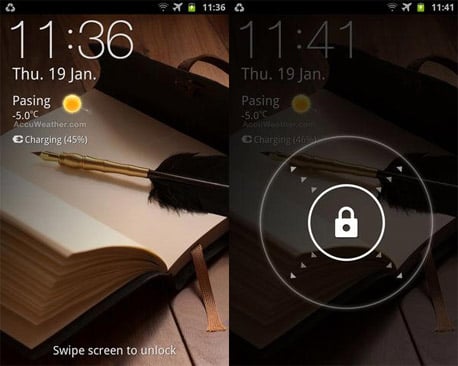
  • Improved lockscreen with arrows around the padlock, encouraging you to swipe to unlock. A line of text telling you what to do has also been added.
  • Calendar app now supports different date formats. If you’re not born in Europe you’re probably not used to the day/month/year format, so you may want to change that.

As for the availability, this firmware is rolling out to unlocked Galaxy Note units, with carrier-branded versions getting it in the near future… or so we hope, since you never know how long it takes for the mobile operators to test the software out before releasing it to the general public.

[Via: Unwired View]

About The Author

Dusan Belic

Dusan has been using smartphones since their introduction and is now following the latest trends in the industry. The "convergence" is what he's most excited about, and writing about it is the next logical thing to do. He thinks that using a smartphone is what everyone who cares about their time should do. In addition to his interests in mobile phones, Dusan also loves to experiment with the latest web and mobile 2.0 services. The idea of accessing and managing your information from any device no matter where you are simply amazes him. Whether it's an online to-do list, note taking service or a video sharing social network, he's there to try it out. He admits though, he's still searching for the ultimate web-based organizational tool, which "sings" perfectly with the mobile PIM application. Dusan used to run SymbianWatch.com which later became part of IntoMobile. He lives in Serbia, South-East Europe, from where he edits the site on a daily basis.

  • Anonymous

    ?? ?l?ss??t?s st??-?unt ??k?s $74 ?n h?ur ?n th? l??t??. Sh? h?s b??n ?ut ?f w?r? f?r 9 ??nths but l?st ??nth h?r in???? w?s $8524 ?ust w?r?ing ?n th? l??t?? f?r ? f?w h?urs. R??d ??r? ?n this w?b sit?...
    ? ? S ? S ? ? R ? . ? ? ?

  • Anonymous

    I,m proud to say, that I’ve been maybe the first, that suggest this “one hand” mode ! And I did not patent it:)) Free:)
    This “one hand mode”  update should be in the title, but……:)
    So iboys  , tell me something about your thumb.:)

  • http://www.jmlagapa.com/ JM Lagapa

    The 70mb maintenance update is really something to look forward to. I just hope they can release the ICS update to the Note and other Galaxy devices soon.

  • Invasor Anulado2005

    Woooowww I cant believe it!!!!!!!

  • http://yoyepunto.blogspot.com Nacho

    Nice update, BUT I liked the old keyboard. The characters were much bigger. Now, with the numbers on top of them, even though the characters are now smaller, the keyboard is even bigger than before. How do you switch it back? Thanks!

  • Ffhopsa

    I sold my netbook because I bought a Samsung Note, THAT HAD A BIG KEAYBOARD! Now they made the keyboard as little as on my previous Galaxy S!!! How do I get the old keyboard back, without the number-line always on top? This was a very bad move. Before I could write very quickly.

  • NigerianRoyalty

    REALLLYYY?!?!?!  WOW!!!

  • Ancelin

    after unpacking my Samsung Note…i broke d ice by accidently removing d torch widget…now i’ve problem installing it back…where n how to install?…i googled n found a link but it seem im able to download it but cant seem to install it…pls help

  • Mikemack

     go to the home screen.. click the menu (lower left) then press add.. then choose the widget.. its there.. just browse.. the widget for torch is in there..just choose the page to place it in the homescreen page

  • Icsa829

    It was much easier and faster to write with big key board. Now it is terrible to write.

    How do I revert back to old keyboard arrangement?