IntoMobile

Breaking news, information, and analysis on the latest mobile phones and mobile technology

Open NavigationOpen Search
  • Home
  • Platforms
    • iOS / iPhone OS
    • Android
    • Windows Phone
    • BlackBerry OS
  • Hardware
    • New Hardware
    • Tablets
    • Reviews
    • Rumors
  • Carriers
    • AT&T
    • Sprint
    • T-Mobile
    • Verizon
  • Manufacturers
    • Apple
    • Samsung
    • HTC
    • LG
    • Motorola
  • Best VPNs
  • Best AI Tools

SwiftKey 4.3 merges smartphone and tablet apps, introduces custom keyboard layouts

October 20, 2013 by Dusan Belic - Leave a Comment

SwiftKey 4.3 merges smartphone and tablet apps, introduces custom keyboard layouts
Share on Twitter Share on Facebook

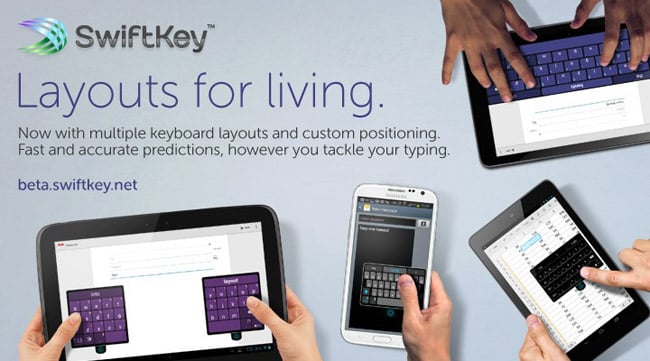
After conducting some extensive user experience (UX) testing and feedback, SwiftKey unveiled version 4.3 of its popular virtual keyboard. Under the new “stigma” called “Layouts for Living,” the company introduced a huge variety of keyboard layouts that can be used in various situations. For instance, commuters in cramped trains may want to type one-handed with their left thumb, while a professional writing a document on a tablet may want to type with both thumbs.

SwiftKey 4.3 (in beta now) supports all of these modes, and best of all – you can customize keyboard the way you want to. Or go for one of the three presets:

  • Compact – which minimizes the width of the keyboard and allows for easier typing with one hand or gesture typing using SwiftKey Flow.
  • Full – that mimics two-handed typing on a physical keyboard, with keys being placed closer together.
  • Thumb – which is made for people typing on tablets or phablets in landscape mode. This mode splits the keyboard into two sections to enable fast, comfortable typing with both thumbs.

Finally, SwiftKey has merged the phone and tablet apps into a single application to give a “seamless experience across all device sizes.”

I can’t recommend SwiftKey enough. As I’ve said it before – it’s by far the best virtual keyboard I’ve ever used. The beta version is available from here.

Share on Twitter Share on Facebook

Back to top ▴

Back to top ▴

Follow IntoMobile

38k
36k
13k
12k

Most Recent Posts

  • Acer’s Sospiro A70 puts a second screen on the back, and it’s actually useful for selfies
  • iPhone Duo launches on time, but finding one is another story
  • One UI 9.0 lets you move your Galaxy Tab taskbar icons left or right
  • ColorOS 17 goes global and OPPO is swinging hard on speed, smoothness, and AI
  • Apple HomeView is here, and it wants to be the center of your home

About IntoMobile

  • About IntoMobile
  • Contact IntoMobile
  • Send us News Tips
  • Privacy Policy

Social Links

  • IntoMobile on Facebook
  • IntoMobile on Twitter
  • IntoMobile on YouTube

Copyright © 2006-2026 IntoMobile. All rights reserved.