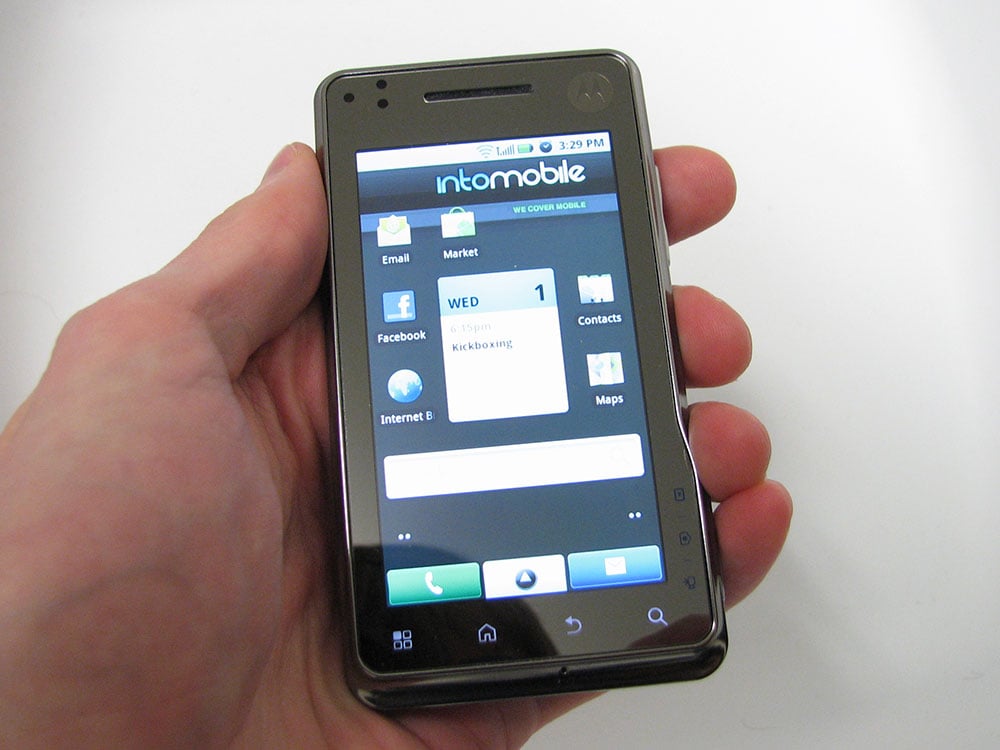
 The Motorola XT720 popped up its head at Mobile World Congress last year as an obscure Android handset due for Korea that would probably never find its way to North America. The months rolled on, and there were a few releases in Europe and a limited U.S. release through Cincinnati Bell, but as Motorola’s other Android handsets got more carrier love, the XT720 and its clunky monicker were forgotten.
 Motorola XT720
Available for free w/ 2-year contract from Cincinnati Bell, $400 on Wind Mobile
Specifications (Specs – sheet)
- 3.7-inch WVGA (480 x 854) display
- 1 GHz CPU, 256 MB of RAM
- 8 megapixel camera with autofocus and xenon flash, 720p video capture
- 3G via HSPA on AWS bands, Wi-Fi b/g
- GPS, Bluetooth 2.1, accelerometer, magnetic compass
- microSD (support for up to 32 GB)
- 3.5mm headphone jack, HDMI-out
- Android 2.1
- 4.5 hours talk time, 13 days standby
- 60.9 x 115.95 x 79.7 mm, and 160 g
The Good
- Solid construction
- Helpful Motorola preloaded software
- Good camera
The Bad
- Iffy battery life
- Sketchy touchscreen keyboard
- Overburdened processor
 Hardware
The Motorola XT720’s hardware is particularly good. It’s got a solid metal frame with a nice dip around the edge, a smooth, unified glass screen, coupled with a soft-finish rear. The capacitive buttons on the front give a really seamless front face, and that slight bump on the right side is actually there for a reason.
See, on the side of the device, you don’t only have a camera shutter key, but a mode select that lets you switch between still camera, video camera, and gallery view modes, with a little light indicator that shows you which is active. A pretty cool idea, especially for a phone whose main selling point is an 8 megapixel camera. The USB and mini-HDMI ports are covered with some plugs that are at times tricky to get out, but not impossible.
The biggest hardware problem that’s worth mentioning is that the display looks like it has an LED pressing hard underneath the screen, leaving this tiny but pronounced spot of brightness in the bottom-left that’s really distracting once you notice it. That’s just as likely a defect on my particular model, but keep an eye out for it.
Software
The Motorola XT720 runs Android 2.1 Eclair, and as such has most of the features you’d expect: live wallpapers, shiny gallery app, five home screens, and free turn-by-turn navigation through Google Maps. Some of the more modern stuff, like mobile Wi-Fi hotspot and Flash 10.1 support won’t arrive until 2.2, and on such an obscure handset as the XT720, I don’t expect it to be high on Motorola’s list of priorities to upgrade.
 As usual, Android offers a nice balance of practicality and style, with really tight synchronization Google services like Mail, Calendar, Contactcs, Maps, and YouTube. Home screen widgets offer some great at-a-glance info and functions, though cramming the ones you want onto the same screen can sometimes be a hassle. For example, I’d love to be able to have Foursquare and Latitude on one home page, but Foursquare’s size makes that impossible. That’s more of a developer choice, to be fair, but at least HTC managed to get around it by offering Scenes, which would let you switch around your home screen layouts at the drop of a dime.
There aren’t any heavy-duty Motoblur enhancements here, but Motorola has included a helpful batch of apps for a variety of situations. They’ve got an in-car app that shows big, simple icons for common car-related apps. There’s also an app that lets you access your phone’s media, call log, and SMS data on a desktop computer over a Wi-Fi network; just launch the app, and punch in the IP address in your browser.
Typing on the touchscreen keyboard I found was a bit troublesome. The word prediction was on the inconsistent side, and the sensitivity was cranked so high that the slightest misstep would mess up any word I was typing. Maybe something like Swype would improve the situation. Just for kicks, I tried out 8pen, and it mostly just made my life miserable. Speaking of third-party apps, I found the number of supporting apps in the Market was better than average; that’s probably because the screen resolution is identical to the original Droid/Milestone.
Overall, the screen and OS was generally very polished, but it felt at times that it was trying to do more than the hardware would allow. Sure, it’s got a 1 GHz processor, but even then, the whole system would stutter occasionally. Maybe I wasn’t doing enough micromanaging with background applications; with only 256 MB of RAM (rather than the standard 512 in many phones now), room for background apps is certainly limited.
Web browser, Multimedia, Camera
Browser
The Motorola XT720 comes with the stock Android WebKit browser, which for most uses is pretty solid. Technically, Flash 10.1 support is landing officially on Android until 2.2, and I’m sure with the right amount of determination, you could get it to run on Android 2.1. I tried for a little bit, but for the unfamiliar there’s only a certain amount of tinkering you can do before either getting a headache or bricking your phone.
 Multimedia
My multimedia experience with the Motorola XT720 was a mixed bag. Yeah, it has HDMI-out so you can view videos on your TV, but they have to be locally-stored (meaning no third-party apps, even YouTube), and I couldn’t get audio to work through my TV (though Will didn’t seem to have any issues with the Droid X).
On top of that, I found that when listening to music through wired headphones, there’s a continual low-grade hiss that really got on my nerves after awhile. Seeing as I’m listening to music pretty much all day through a phone, this issue alone would be a deal-breaker. Speaking of music, there’s an FM radio on here, if you’re into that kind of thing, plus some equalizer options to crank up the bass or treble, or optimize listening with genre-based presets.
On the whole, there are a number of really cool multimedia features that come included on the XT720, such as DLNA compatibility if you happen to own a Wi-Fi-equipped entertainment system to shunt your music and video to. I’m not so lucky to own a TV like that, so can’t really test it, but the option’s there if you do. Plus HDMI-out is still a nice option to have if you’ve got some photos you want to show off to the family. All that being said, multimedia is probably the XT720’s strong suit, though there’s plenty of room for improvement.
Camera
The 8 megapixel camera on the XT720 definitely looks good on paper, especially up here in Canada where such a sight is rare on Android phones. Though predictably noisy, I found action shots in low-light to be really good. Check out this one of Chainsaw Charlie from White Cowbell Oklahoma. Good enough for Facebook, at the very least.
 Close-up was decent, but it doesn’t seem quite as sharp as those with the Bold 9780’s 5 megapixel camera.
 Finally, a regular ol’ daylight landscape shot. Here’s a pretty nice one at dusk.

Call Quality and Battery Life
I found call quality on the Motorola XT720 exceptionally clear and loud, and had no issues with dropped calls on Wind’s Ottawa network. I was a little worried that as a carrier starting from scratch I would have some service issues, but everything worked hunky-dory.
Battery life is about what you’d expect for a full-touchscreen smartphone: unlikely to get through a solid day of use without a charge somewhere mid-day. Motorola says you can get 320 hours of standby and 270 minutes of talk on 3G. If that’s enough for you, bonus, but it’s not for me. Just make sure to use that Android power management widget, and you should be able to keep battery levels reasonable, but that’s too much ongoing fiddling for my taste.
 Verdict
Of the carriers that sell it, the Motorola XT720 will stick out on their roster for having a solid specs sheet, but I found that the lack of Motoblur and inconsistent keyboard performance to make it feel like the XT720 was the Droid X’s outcast third-cousin from Latvia. Sadly, in Canada this is as close to a Droid X as we’re going to get, which means I would sooner suggest the Nexus One on Mobilicity if you’re going the no-contract route. Yeah, you’re taking a bit of a hit with the lower-quality camera and no more HDMI-out, but I find it’s made up for in a smoother software experience. If you need to keep the big screen, Samsung has a few nice options, so long as you’re willing to sign a three-year contract with the big carriers.
I would suggest the Motorola XT720 to those who wanted a multimedia-rich smartphone on the cheap, and didn’t necessarily place a high priority on messaging; sure, it handles Gmail and texts fine, but unless you’ve got something like Swype handy, the XT720 isn’t going to be especially efficient at text input.