
Apple has issued an update to their eBook reading platform “iBooks”, now up to version 1.2, and we’ve embedded the full change-log below, but before you scroll down I’d like to take a moment to tell you to visit your local library. You don’t need a $500 tablet or a $200 iPod made out of components that had to be extracted out of the ground by workers who have bosses that could care less about safety standards. You don’t need an Amazon Kindle either, trust me, I bought one, and it was exciting for a week or two before I realized that nothing can replace the quality of a printed magazine or the weight of a significant piece of work like A People’s History of the United States by Howard Zinn. You’ve been sold a con, that the new way is better, when really it isn’t. Just like you listen to streaming music and stream your videos from either Hulu or Netflix, visiting your local library and renting a book for 3 weeks is exactly the same thing. Why should you pay for books?

Let that all sink in. Many of you will ignore my advice, call me insane, that I’m not pushing the agenda of the very same consumer electronics industry that pays my bills and keeps my refrigerator full, but sometimes you just have to step away from the battery powered toys and step into the ancient world of paper and ink. You’ll feel better when you do.
[Detailed walk through of the new iBooks at MacLife]
What’s New in Version 1.2:
- Experience fully illustrated books, from children’s picture books to beautifully designed art books, available for download in the iBookstore.
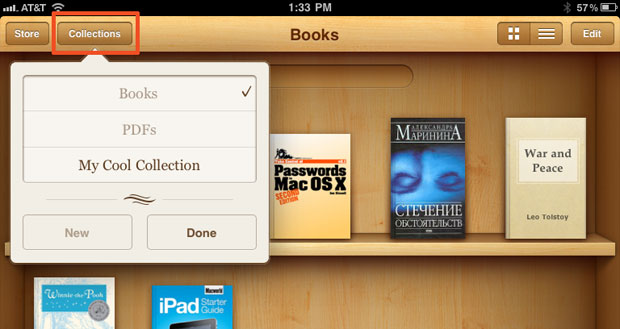
- Organize your books and PDFs into personal Collections. Swipe left or right to jump between Collections.
- Print PDF documents and notes you’ve written in iBooks using AirPrint.
- iBooks now fits more words per page by automatically hyphenating text, available only on iOS 4.2 or later.