There’s a way to make your iTunes library sing along your brand new HTC Evo 3D. As a matter of fact, you can move music from your computer sans any wires, something even iPhone users can’t do (at least until iOS 5 is released). Best of all, once you set everything up, the process is super seamless.
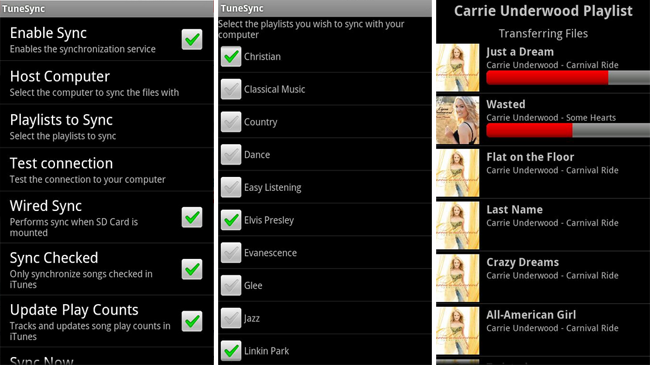
The magic happens with an app called TuneSync, which must be installed both on your computer (whether it’s a Mac or PC) and the HTC Evo 3D. Once that is set, follow these steps:
- First of all you’ll need to create Playlists that you want to move to the Evo 3D. Do that from iTunes.
- From the TuneSync on your smartphone, select the Host Computer option.
- When Evo 3D is connected to your computer via TuneSync, the application on your Android device will show you a list of all the playlists.
- Select playlists you want to sync.
- On the main screen of the Android app make sure that “Enable Sync” has a check mark beside it.
- Scroll down, select “Sync Now” and…
You’re done! What’s more, from now on TuneSync will periodically synchronize your library without even asking you (presuming you haven’t disabled this option).
TuneSync for Android costs $4.99 and there’s also a free Lite version which is limited to 20 songs and 1 playlist…
TuneSync ($4.99) [Android Market link]
TuneSync Lite (FREE) [Android Market link]