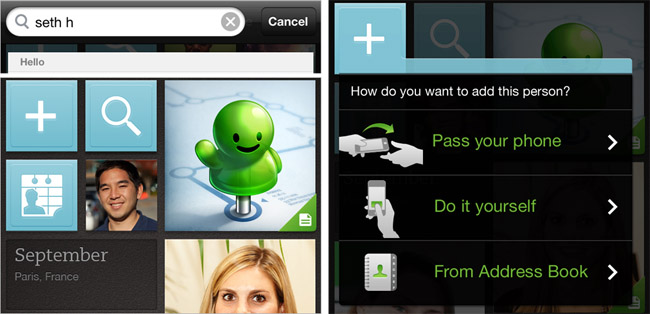
Evernote has updated its people-note app, Evernote Hello, for iPhone. The massive update brings the application version to 1.1, while making “every action and interaction faster, easier and more natural.” Here are the highlights:
- There are new ways to add new people – you can either pass the phone to the person you are meeting, create their profile yourself or pull from the phone’s address book.
- Search – located at the top of the home screen, you can use it to search through your Evernote Hello history by names of people, the places you were, calendar events, email; and also look for matches in your address book.
- Contact Links – allows you to merge an Address Book entry with that person’s Evernote Hello record.
- Intelligent name detection – the application now uses your location and the input language to figure out how the name should be laid out (first name, last name or last name, first name).
- Calendar tiles – let you visually scan throughout the mosaic to designate chronological breaks.
Additionally, there are other smaller changes included like full-screen photos, ability to choose a contact photo from the Camera Roll, smart phone number formatting, ability to log out from the app and the brand new app icon.
Unfortunately, Android version is still missing and we can only hope it will be out soon…
Evernote Hello (FREE) [iTunes link]