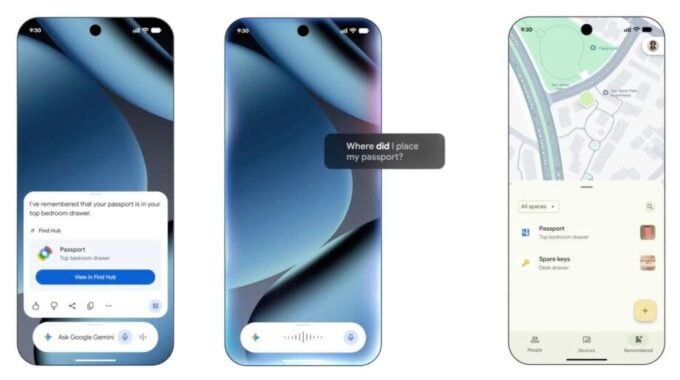
If you have ever torn apart your entire home looking for your passport twenty minutes before a taxi arrives, Google has your back. The company announced a batch of new Android features rolling out this September, and the standout is a Find Hub update that lets you verbally tell Gemini where you’ve stashed your valuables. No Bluetooth tracker required. No tile to attach. Just your voice.
Here’s how it works. You say something like “Hey Google, remember in Find Hub that I put my passport in the vault inside my bedroom cabinet,” and Gemini logs it. You can even attach a photo to the entry. Then when you need the item, you just ask and Gemini tells you exactly where you put it. You can also browse all your saved items and locations directly in Find Hub. The feature is coming to Android 16 and newer devices in regions where both Gemini and Find Hub are supported.
This is a smart move from Google. Apple’s Reminders and Notes apps have been chipping away at everyday memory tasks for years, but the physical location angle is something different. Most tracker apps require hardware. Doing this purely through voice and software lowers the barrier significantly, and it genuinely makes Find Hub more useful for people who don’t own a single Pixel Tag or any compatible accessory. For anyone with ADHD, chronic forgetfulness, or just a chaotic lifestyle, this kind of frictionless logging could become a daily habit fast.
Android 17 users also get something called Motion Assist, designed to reduce motion sickness when you’re staring at your phone in a moving vehicle. It overlays small transparent bubbles on your screen that move in sync with the vehicle’s motion, trying to close the gap between what your eyes see and what your body feels. You can tweak the bubble shape, color, and opacity, and set it to activate automatically or pin it to Quick Settings. The science behind motion sickness and visual cues is real, so this isn’t just a gimmick. Whether the execution actually helps will depend on how polished the effect is in practice.
For users with visual impairments, Google is bringing Guided Vision to devices running Android 9 or newer. It works through Gemini Live and lets the AI describe what’s in front of you using your camera in real time. It can read menus and labels aloud, and help you locate specific objects. You can add it to Accessibility shortcuts or launch it from TalkBack. This feels like one of the more meaningful additions in the batch, and it speaks to a broader push across the industry to make AI assistants genuinely useful for accessibility rather than just a marketing checkbox.
On the messaging side, Google is rolling out two updates today. First, Keep notes can now be shared inside Messages conversations, letting everyone in the chat edit and add to lists in real time. Shared shopping lists inside a message thread is actually practical. Second, Messages is getting conversation themes, so you can pick custom colors and wallpapers for individual chats. That one’s pure personalization, but people love it and it keeps Android competitive with iMessage’s visual customization options.
Overall this is a solid September update. Nothing here is trying too hard to impress. These are features that solve real, everyday problems, and that’s exactly the kind of progress worth paying attention to.