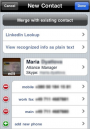
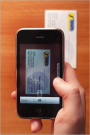
Collecting business cards can be a good thing – expanding your professional network usually is. It can also suck. If you ever have the chance to wade through a stack of business cards and add those contacts by hand, give it a try, you’ll see what we mean. For those of you that share our pain, check out SHAPE Services’ Business Card Reader for iPhone. With a simple snap of your iPhone 3GS’s auto-focus camera, Business Card Reader injects contact information directly into your iPhone’s address book. It’s not free, but at $5.99, it’ll easily pay for itself after your next new business card.
The new app basically scans your business cards and analyzes the text using character recognition technology. But, the really nifty thing is the way Business Card Reader integrates with LinkedIn and your iPhone. It’ll automatically distinguish between home and mobile phone numbers, office address, website URL, job title, company and, of course, the first and last name. Once scanned, you’ll have the option of automatically adding a new contact, merging the data with an existing contact, or look up the information on LinkedIn.
Of course, the app is bound to make some mistakes. After testing five business cards, we had to specify one company name and break up a couple long first names into their respective first and last names. You’re also going to want to use this app on an iPhone 3GS. The auto-focus camera makes all the difference. The app isn’t perfect, but it’s way (way) better than the alternative.
Wanna see the app in action? Check out our demo video!
BC Reader [iTunes link]