IntoMobile

Breaking news, information, and analysis on the latest mobile phones and mobile technology

Open NavigationOpen Search
  • Home
  • Platforms
    • iOS / iPhone OS
    • Android
    • Windows Phone
    • BlackBerry OS
  • Hardware
    • New Hardware
    • Tablets
    • Reviews
    • Rumors
  • Carriers
    • AT&T
    • Sprint
    • T-Mobile
    • Verizon
  • Manufacturers
    • Apple
    • Samsung
    • HTC
    • LG
    • Motorola
  • Best VPNs
  • Best AI Tools

How-To: Turn off cookies on your Windows Phone 7 smartphone

June 14, 2011 by Dusan Belic - 3 Comments

Share on Twitter Share on Facebook ( 0 shares )

With the rising privacy concerns and the media attention this issue gets, users all around the world are getting serious about leaving their data to third party companies and websites. Cookies are part of the equation and many folks think it’s a good idea to turn them off in some instances. If you own a Windows Phone 7 device you may don’t know how to do this. It’s actually pretty easy – here’s how to do it:

  1. Tap “Start,” and flick left to the App list, then tap “Settings.”
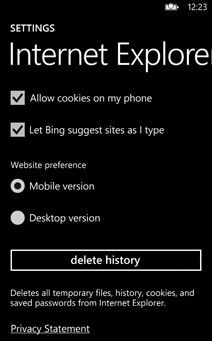
  2. Flick to “Applications,” then “Internet Explorer.”
  3. From here you can check or uncheck “Allow cookies on my phone” to permit or block cookies from being saved on your phone.

While at this page, you can also delete your complete browsing history, which includes cookies, visited web pages and saved passwords. To do that, simply tap “Delete history” and you’re done. I told you it’s easy…

Share on Twitter Share on Facebook ( 0 shares )

Back to top ▴

Back to top ▴

Follow IntoMobile

38k
36k
4k
13k
12k

Most Recent Posts

  • Vivo X500 Pro Max just hit 4,000 on Geekbench single-core, and that’s a big deal
  • Oppo A7 Pro listing confirms specs, and this budget phone is looking surprisingly serious
  • Samsung Galaxy A18 4G leaks with familiar looks and barely changed specs
  • Xiaomi Pad 9 Pro Max could be the secondary monitor you didn’t know you needed
  • Oppo A7 Pro is coming September 11 with an 8,000 mAh battery that’s built to last years

Get Updates Via E-Mail

  • This field is for validation purposes and should be left unchanged.

About IntoMobile

  • About IntoMobile
  • Contact IntoMobile
  • Send us News Tips
  • Privacy Policy

Social Links

  • IntoMobile on Facebook
  • IntoMobile on Twitter
  • IntoMobile on Google+
  • IntoMobile on YouTube

Copyright © 2006-2021 IntoMobile. All rights reserved.