IntoMobile

Breaking news, information, and analysis on the latest mobile phones and mobile technology

Open NavigationOpen Search
  • Home
  • Platforms
    • iOS / iPhone OS
    • Android
    • Windows Phone
    • BlackBerry OS
  • Hardware
    • New Hardware
    • Tablets
    • Reviews
    • Rumors
  • Carriers
    • AT&T
    • Sprint
    • T-Mobile
    • Verizon
  • Manufacturers
    • Apple
    • Samsung
    • HTC
    • LG
    • Motorola
  • Best VPNs
  • Best AI Tools

iFuntastic 2.1 released – now you can rearrange the main menu icons and change the AT&T logo

July 30, 2007 by Dusan Belic - Leave a Comment

Share on Twitter Share on Facebook

We already wrote about that easy to use utility called iFuntastic that allows iPhone users to add a custom ringtone to their beloved handset. Thanks to Gizmodo, we spotted that the new version is now out and this time it goes one step further. Not only that you can make your iPhone sound different — you can also rearrange the main menu icons and swap the AT&T logo for any PNG image at 65 x 18 pixels. Plus, the new version also brings much better instructions, more sample logos and ringtones, the news feature to the Welcome screen, and more. Interested? Grab it from either Rapidshare or iPhone Alley.
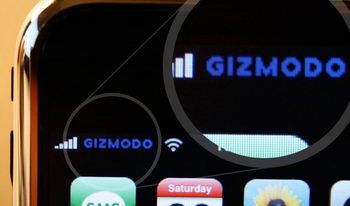
iFuntastic 2.1

Share on Twitter Share on Facebook

Back to top ▴

Back to top ▴

Follow IntoMobile

38k
36k
13k
12k

Most Recent Posts

  • iPhone Duo launches on time, but finding one is another story
  • One UI 9.0 lets you move your Galaxy Tab taskbar icons left or right
  • ColorOS 17 goes global and OPPO is swinging hard on speed, smoothness, and AI
  • Apple HomeView is here, and it wants to be the center of your home
  • Apple’s new Apple TV 4K gets hands-free Siri and four-speaker surround sound

About IntoMobile

  • About IntoMobile
  • Contact IntoMobile
  • Send us News Tips
  • Privacy Policy

Social Links

  • IntoMobile on Facebook
  • IntoMobile on Twitter
  • IntoMobile on YouTube

Copyright © 2006-2021 IntoMobile. All rights reserved.