IntoMobile

Breaking news, information, and analysis on the latest mobile phones and mobile technology

Open NavigationOpen Search
  • Home
  • Platforms
    • iOS / iPhone OS
    • Android
    • Windows Phone
    • BlackBerry OS
  • Hardware
    • New Hardware
    • Tablets
    • Reviews
    • Rumors
  • Carriers
    • AT&T
    • Sprint
    • T-Mobile
    • Verizon
  • Manufacturers
    • Apple
    • Samsung
    • HTC
    • LG
    • Motorola
  • Best VPNs
  • Best AI Tools

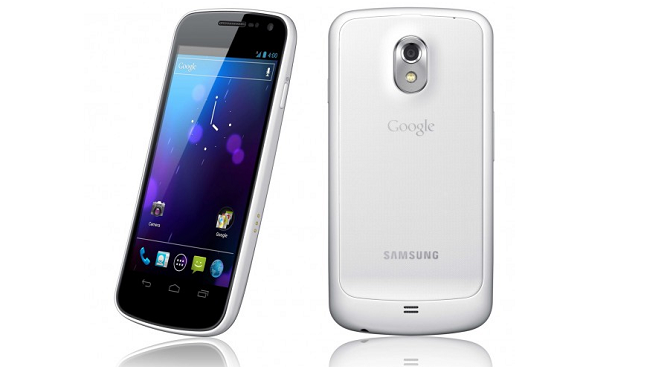
Wish you went for the white Galaxy Nexus? Replace the back yourself!

April 10, 2012 by Blake Stimac - 1 Comment

Share on Twitter Share on Facebook ( 0 shares )

If you’re holding onto a Galaxy Nexus and wish that you would have opted for the white version, then you’re in luck. The procedure is rather simple and you only need a few items to get things rolling.

Like the Nexus S, the white version of the Galaxy Nexus is only white on the back side, leaving the face of the device black around the screen. Some may like the contrast between the back and the front but it seems a bit stark and tacky to me. Still, with a screwdriver, some guitar picks, and the replacement backing, you can easily switch up the look of your Galaxy Nexus without the need of a case.

While it may seem a bit tricky to get the housing off of the back of the device, a little patience will do the trick.

For an even more detailed how-to, head over to Droid-Life in the link below!

[Via: Droid-Life]

Share on Twitter Share on Facebook ( 0 shares )

Back to top ▴

Back to top ▴

Follow IntoMobile

38k
36k
4k
13k
12k

Most Recent Posts

  • Verizon scraps upgrade fees and launches its first loyalty program for all customers
  • OnePlus 15R launches in India with a new 16GB RAM option
  • Google Home Speaker review: The first smart speaker built for Gemini
  • Apple releases second developer betas for iOS 26.6, macOS Tahoe 26.6, and more
  • Verizon’s $1 billion spectrum deal draws fire from smaller carriers

Get Updates Via E-Mail

  • This field is for validation purposes and should be left unchanged.

About IntoMobile

  • About IntoMobile
  • Contact IntoMobile
  • Send us News Tips
  • Privacy Policy

Social Links

  • IntoMobile on Facebook
  • IntoMobile on Twitter
  • IntoMobile on Google+
  • IntoMobile on YouTube

Copyright © 2006-2021 IntoMobile. All rights reserved.