Foldable phones have always had an identity problem. They cost more than flagship phones, they fold, and yet most apps still treat them like slightly wider rectangles. Gaming has been one of the most obvious missed opportunities. That is starting to change with Android 17.
Google briefly mentioned foldable gaming improvements during its Android 17 announcement on June 16. Now there is a much clearer picture of how it actually works. Android Community Engagement Manager Mishaal Rahman posted extensive details and images to the Android Gaming subreddit, giving the first real look at the feature in action.
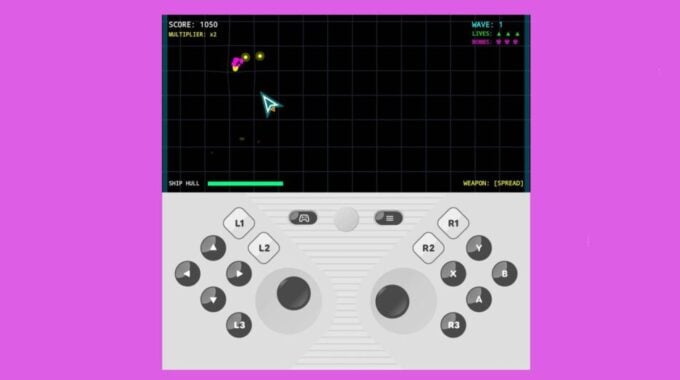
The setup is straightforward. When you open a game on a foldable running Android 17, the screen splits 50/50. The top half shows the game. The bottom half becomes a virtual gamepad. Anyone who owned a Nintendo DS will immediately recognize the appeal. It is the same basic idea, just on a device you already carry in your pocket.
Any game that supports physical controllers will work with this mode. The virtual gamepad covers all the inputs you would expect from a standard controller:
- D-pad
- Left and right thumbsticks
- A, B, X, Y action buttons
- L1, L2, L3
- R1, R2, R3
- Start button
Google is also letting phone manufacturers adjust the gamepad layout to match their specific screen dimensions, which matters more than it sounds. One of the real problems with mobile gaming is physical comfort. Gripping a small device while pressing virtual buttons on a flat glass surface causes hand cramps fast. A properly sized gamepad that fits the actual screen could make longer sessions much more manageable.
The gamepad has two layout options. The default is called “Twin stick, Inline” and there is also a “Twin stick, Staggered” option, which repositions the left thumbstick, D-pad, and shoulder buttons. Beyond layout, players can set the gamepad size to small, medium, or large, switch between light and dark themes, and turn haptic feedback on or off for button presses.
The gamepad also knows when to stay out of the way. It hides automatically when you play touch-only games, and you can manually hide it through a menu whenever you want. If you connect an external controller via Bluetooth or USB, the virtual gamepad disables itself. Android already supports several third-party controllers, including the GameSir T4 Cyclone Pro.
These features will arrive with the final release of Android 17, expected within the next few months. For foldable owners who have been waiting for software that actually takes advantage of the hardware they paid for, this is a genuinely useful addition.