IntoMobile

Breaking news, information, and analysis on the latest mobile phones and mobile technology

Open NavigationOpen Search
  • Home
  • Platforms
    • iOS / iPhone OS
    • Android
    • Windows Phone
    • BlackBerry OS
  • Hardware
    • New Hardware
    • Tablets
    • Reviews
    • Rumors
  • Carriers
    • AT&T
    • Sprint
    • T-Mobile
    • Verizon
  • Manufacturers
    • Apple
    • Samsung
    • HTC
    • LG
    • Motorola
  • Best VPNs
  • Best AI Tools

Air Display turns iPad into extra PC monitor

July 5, 2010 by Dusan Belic - Leave a Comment

Share on Twitter Share on Facebook

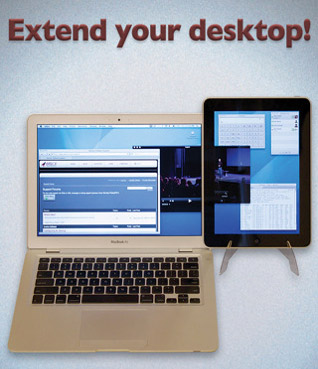
A company called Avatron Software is out with a cool iPad app, Air Display, that effectively turns Apple’s tablet into an extra PC monitor. You’ve heard that correctly, when you need more space on your screen, simply place your iPad near your monitor and voila, you get get additional 9.7 inches of the screen estate.

At the moment, Air Display works with Macs only, with Windows version of a desktop/laptop app set to be released shortly. In that sense, Avatron suggests using the application alongside the MacBook Air (or MacBook which also has a 13.3-inch screen).

Air Display works over WiFi and leverages the iPad’s auto-rotation feature, allowing the device to be rotated in portrait or landscape orientation as needed. The iPad can be positioned to the left or right of the primary screen. The app rocks a screen refresh rate of 150 frames per second for no perceivable lag time in mouse performance. Compressed image quality and refresh speed are continually balanced to optimize viewing quality or speed of movement as needed.

Finally, Avatron suggests that for best results, a stand may be used to position the iPad in the ideal viewing position.

Air Display ($9.99) [iTunes link]

Share on Twitter Share on Facebook

Back to top ▴

Back to top ▴

Follow IntoMobile

38k
36k
4k
13k
12k

Most Recent Posts

  • iPhone Duo launches on time, but finding one is another story
  • One UI 9.0 lets you move your Galaxy Tab taskbar icons left or right
  • ColorOS 17 goes global and OPPO is swinging hard on speed, smoothness, and AI
  • Apple HomeView is here, and it wants to be the center of your home
  • Apple’s new Apple TV 4K gets hands-free Siri and four-speaker surround sound

About IntoMobile

  • About IntoMobile
  • Contact IntoMobile
  • Send us News Tips
  • Privacy Policy

Social Links

  • IntoMobile on Facebook
  • IntoMobile on Twitter
  • IntoMobile on Google+
  • IntoMobile on YouTube

Copyright © 2006-2021 IntoMobile. All rights reserved.