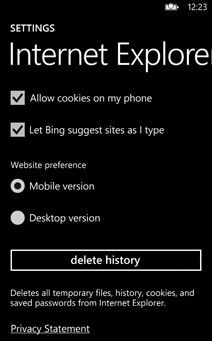
With the rising privacy concerns and the media attention this issue gets, users all around the world are getting serious about leaving their data to third party companies and websites. Cookies are part of the equation and many folks think it’s a good idea to turn them off in some instances. If you own a Windows Phone 7 device you may don’t know how to do this. It’s actually pretty easy – here’s how to do it:
- Tap “Start,” and flick left to the App list, then tap “Settings.”
- Flick to “Applications,” then “Internet Explorer.”
- From here you can check or uncheck “Allow cookies on my phone” to permit or block cookies from being saved on your phone.
While at this page, you can also delete your complete browsing history, which includes cookies, visited web pages and saved passwords. To do that, simply tap “Delete history” and you’re done. I told you it’s easy…