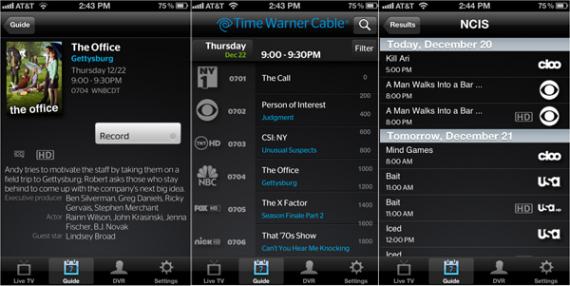
Time Warner Cable today made its debut on iOS by releasing its new TWC TV app for the iPhone. This app lets customers watch live TV from the house, change channels on their set-top box and manage their DVR right from their iOS handset. The cable provider is likely responding to Comcast’s recently launched AnyPlay service which is accessed through the Xfinity TV app, as this feature is available at no additional cost to Time Warner Cable video customers that have a broadband connection.
Features on TWC TV include:
- Interactive program guide (IPG) – up to 7 days of listings. View detailed show descriptions including box art. Option to display “HD only” or “favorites only” by creating a favorite channel list.
- Search – search for programming by title or episode name and filter results by genre
- Set-top box tuning – tap on a network logo or “watch on TV” button within the program description to tune compatible set-top boxes directly to the channel
- DVR management – schedule one-time and series recordings on compatible DVRs directly from the IPG. Tap on the “DVR” button to see a list of all upcoming recordings and make changes or cancel recordings
If you’re a Time Warner Cable customer you can head over to the App Store and download the TWC TV app right now.
[via Business Wire]