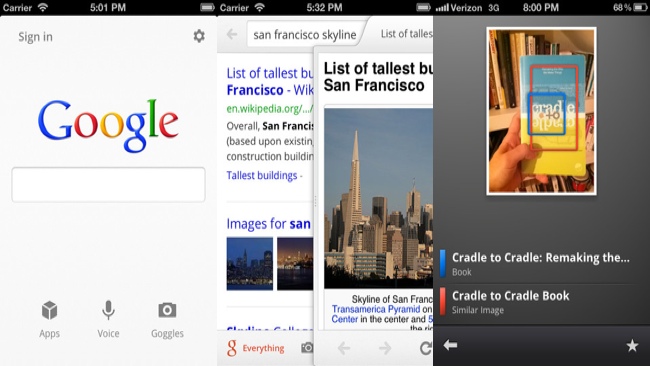
Google released version 2.0 of the Google Search app for iPhone and iPod touch. With it comes a brand new redesign that may look familiar if you have the iPad app.
The app still retains much of its different features and Google services, but when you first launch it with the update, the simple and clean home screen might suggest otherwise. You have the classic Google search bar followed by a row of three icons for Apps, Voice and Goggles. Tapping Apps brings up a grid of Google services and you can toggle between web apps and apps available on the iPhone. Voice is naturally for conducting a voice search and Goggles is Google’s name for its visual search function. The latter can act as a way to search for physical objects you snap a picture of or to translate text on a printed page to or from a foreign language.
Aside from the dramatically improved design, there’s a lot of functionality improvements as well. Things like full-screen web browsing, full-screen image search, swipe gestures, the ability to find text on any web page, and the ability to save images to the camera roll when performing an image search are all present in the 2.0 update. Throughout the app you should also notice the some subtle new transitional effects and speed enhancements.
The Google Search app for iPhone is now up to speed with the iPad app in terms of features and has a more consistent look and feel. You can download it for free in the App Store.