IntoMobile

Breaking news, information, and analysis on the latest mobile phones and mobile technology

Open NavigationOpen Search
  • Home
  • Platforms
    • iOS / iPhone OS
    • Android
    • Windows Phone
    • BlackBerry OS
  • Hardware
    • New Hardware
    • Tablets
    • Reviews
    • Rumors
  • Carriers
    • AT&T
    • Sprint
    • T-Mobile
    • Verizon
  • Manufacturers
    • Apple
    • Samsung
    • HTC
    • LG
    • Motorola
  • Best VPNs
  • Best AI Tools

How To Access the Moto X’s Hidden LED Light

January 7, 2014 by Ian Kersey - Leave a Comment

Share on Twitter Share on Facebook

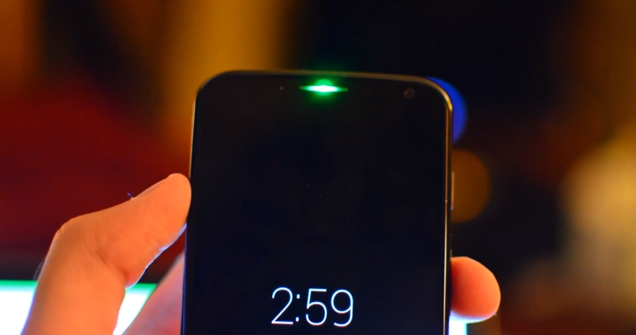
Well what do you know, it looks like the Moto X has had a notification LED all along! Thanks to an XDA thread spotted by Droid-Life, we now know of its existence and how you can activate it yourself. It takes a little gumption and root to activate though, but that won’t be a problem for you will it?

And where exactly is this mystery LED hidden? Right under our ears. The green LED lies just underneath the speaker, and was intended by its maker, Motorola, to only flash when the battery is critically low. Like can’t power on the screen and display the low battery icon low. What a waste!

XDA user carock invented a way to access the green LED, using Tasker as the method of injecting code. You will also need root to compete the task, so if your device is unrooted, you may want to tackle this task when you have a little bit of spare time. When you’re ready to root your Moto X, just do a simple web search as many video tutorials are available.

So, go on then! Check out the video below for a step by step guide to accessing your Moto X LED notification light. Check out the XDA thread here.

via: Droid Life

Share on Twitter Share on Facebook

Back to top ▴

Back to top ▴

Follow IntoMobile

38k
36k
13k
12k

Most Recent Posts

  • iPhone Duo launches on time, but finding one is another story
  • One UI 9.0 lets you move your Galaxy Tab taskbar icons left or right
  • ColorOS 17 goes global and OPPO is swinging hard on speed, smoothness, and AI
  • Apple HomeView is here, and it wants to be the center of your home
  • Apple’s new Apple TV 4K gets hands-free Siri and four-speaker surround sound

About IntoMobile

  • About IntoMobile
  • Contact IntoMobile
  • Send us News Tips
  • Privacy Policy

Social Links

  • IntoMobile on Facebook
  • IntoMobile on Twitter
  • IntoMobile on YouTube

Copyright © 2006-2021 IntoMobile. All rights reserved.