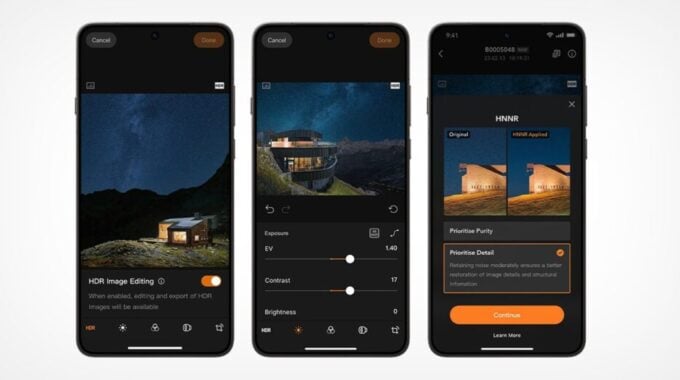
Hasselblad has announced that Phocus Mobile V1.0.0 for Android is now available as a free download. The app supports the X2D II 100C, X2D 100C, 907X, and CFV 100C cameras.
This is a long time coming. Phocus Mobile has been on Apple iOS for years, and reached version 2 back in August 2020. Android photographers have had to wait six years for comparable support, and even now the Android release is not a perfect match for the iOS version. Most notably, mobile phone tethering, which was added in Phocus Mobile 2 on iOS, is absent from the Android app at launch.
Still, the arrival of Phocus Mobile on Android is meaningful for a brand that sells cameras starting well above $5,000. Medium format shooters are often professionals working on location, and having a capable mobile editing and review tool matters when you are away from a desktop.
The core of the Android app is built around Hasselblad’s Natural Colour Solution, known as HNCS. The company describes it as an end-to-end workflow that preserves true-to-life colour, smooth tonal gradation, and highlight detail from preview through to final export. Images can be transferred from a camera to an Android device over WiFi or via a USB-C connection. The wired USB-C option only works with the X2D II 100C running firmware version 1.3.16.1 or later.
The app also includes Hasselblad Natural Noise Reduction, or HNNR. This is an AI-powered noise reduction tool trained on hundreds of thousands of Hasselblad images and calibrated specifically for the brand’s medium format sensors. According to Hasselblad, it can process a 100MP RAW file in roughly 15 to 20 seconds. There are two modes to choose from:
- Purity Mode focuses on suppressing noise for a clean result and is recommended for most shooting situations.
- Detail Mode keeps luminance noise intact, which is better for preserving micro-textures and fine image detail.
HDR support is also part of the package. Photos shot in HDR on the X2D II 100C display correctly on HDR-compatible Android devices, and can be exported as Ultra HDR JPG. Standard RAW images can also be exported as Ultra HDR JPG or HDR TIFF.
To run the app, your Android device needs at least 12 GB of RAM and Android 12 or later. Hasselblad recommends Android 16 or later and a Snapdragon 8 Gen 3 processor or newer for the best colour accuracy and editing performance. The app is free to download from the Google Play Store.
The broader trend here is worth noting. Camera brands have been slow to build serious mobile companion apps, often treating them as afterthoughts. Hasselblad taking the time to build a tool that handles 100MP RAW files, AI noise reduction, and HDR export on a phone signals that the company sees mobile review and editing as a real part of a professional workflow, not just a marketing checkbox.