IntoMobile

Breaking news, information, and analysis on the latest mobile phones and mobile technology

Open NavigationOpen Search
  • Home
  • Platforms
    • iOS / iPhone OS
    • Android
    • Windows Phone
    • BlackBerry OS
  • Hardware
    • New Hardware
    • Tablets
    • Reviews
    • Rumors
  • Carriers
    • AT&T
    • Sprint
    • T-Mobile
    • Verizon
  • Manufacturers
    • Apple
    • Samsung
    • HTC
    • LG
    • Motorola
  • Best VPNs
  • Best AI Tools

Chase iPhone app lets you deposit checks by taking pictures

July 2, 2010 by Marin Perez - 16 Comments

Share on Twitter Share on Facebook

There’s good news if you’re a Chase bank member and rock an Apple iPhone, as the banking app has been updated to include cool new features.

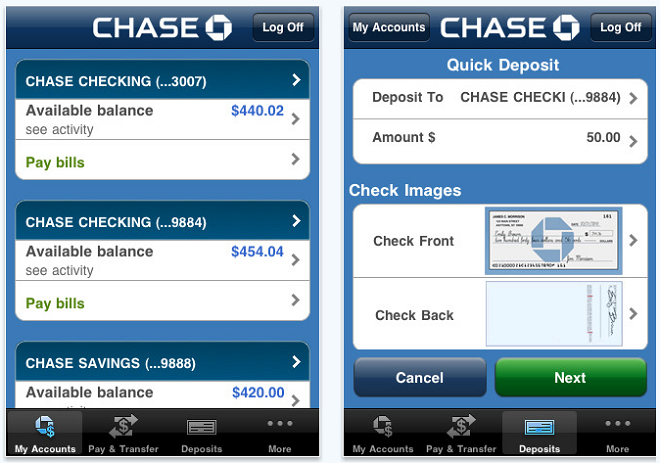
The iPhone app lets you do what you’d expect, including finding ATMs near you, check account balances and transfer funds. The cool part of this update is that now you can use the Apple iPhone camera to deposit checks.

How does it work? Well, you just fire up the app and then take a clear picture of the front and back of the check you want to deposit (make sure you sign it, too). The app will be able to analyze the amount and validity of the check and then you’ll be able to deposit it to the account of your choosing.

This isn’t the first bank to do this, but Chase is the first mainstream bank to offer this check-depositing capability. I use Chase for my banking needs and I can’t wait to try this out.

I wouldn’t be too worried about security implications, as optical scanning is essentially how ATMs accept checks nowadays. Using your phone to accomplish this can just save you a trip to your bank. Besides, it’s all fiat money anyways, so the physical check’s not that important.

appstorebadge Chase Mobile Available on iPhone – Download Chase Mobile for iPhone (free) [iTunes Link]

Share on Twitter Share on Facebook

Back to top ▴

Back to top ▴

Follow IntoMobile

38k
36k
13k
12k

Most Recent Posts

  • iPhone Duo launches on time, but finding one is another story
  • One UI 9.0 lets you move your Galaxy Tab taskbar icons left or right
  • ColorOS 17 goes global and OPPO is swinging hard on speed, smoothness, and AI
  • Apple HomeView is here, and it wants to be the center of your home
  • Apple’s new Apple TV 4K gets hands-free Siri and four-speaker surround sound

About IntoMobile

  • About IntoMobile
  • Contact IntoMobile
  • Send us News Tips
  • Privacy Policy

Social Links

  • IntoMobile on Facebook
  • IntoMobile on Twitter
  • IntoMobile on YouTube

Copyright © 2006-2021 IntoMobile. All rights reserved.