IntoMobile

Breaking news, information, and analysis on the latest mobile phones and mobile technology

Open NavigationOpen Search
  • Home
  • Platforms
    • iOS / iPhone OS
    • Android
    • Windows Phone
    • BlackBerry OS
  • Hardware
    • New Hardware
    • Tablets
    • Reviews
    • Rumors
  • Carriers
    • AT&T
    • Sprint
    • T-Mobile
    • Verizon
  • Manufacturers
    • Apple
    • Samsung
    • HTC
    • LG
    • Motorola
  • Best VPNs
  • Best AI Tools

Yamli Brings Arabic Translation App to iPhone and iPad

October 4, 2010 by James Falconer - Leave a Comment

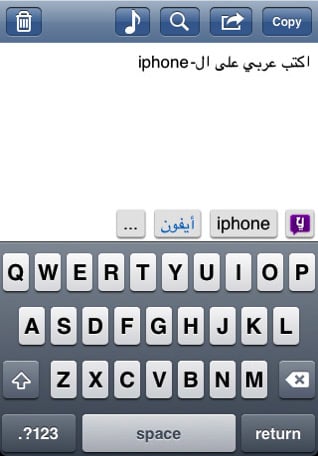
Yamli Arabic Translation App for iPhone and iPad
Share on Twitter Share on Facebook

Yamli Arabic Translation App for iPhone and iPad

Released at the beginning of the month from the folks at Language Analytics, the Yamli Arabic Keyboard and Search app brings a powerful Arabic translation tool to iPhone and iPad. Building upon the success of their website at Yamli.com (more than 10 million have used the online service, and more than 300 million words have been typed), the new tool brings a boatload of features for iOS users.

Key features include:

  • a smart Arabic keyboard: type Arabic words phonetically in English, and Yamli does the rest
  • send SMS and email in Arabic
  • search the web, maps and music in Arabic
  • doesn’t require an internet connection to work (nice feature!)
  • many new features to come in future updates, including social media integration and a smart search

The price? You’re looking at $3 for the app… For a translation tool that helps you convert English to Arabic, and vise versa, that’s not so bad at all. Personally, I’d say it’s worth the $3 after the first use! For more information or to grab your copy, pop open the App Store on your device, or hit up the iTunes link below.

Yamli for iPhone and iPad ($2.99) [iTunes link]

[Via: TheNextWeb]

Share on Twitter Share on Facebook

Back to top ▴

Back to top ▴

Follow IntoMobile

38k
36k
13k
12k

Most Recent Posts

  • Acer’s Sospiro A70 puts a second screen on the back, and it’s actually useful for selfies
  • iPhone Duo launches on time, but finding one is another story
  • One UI 9.0 lets you move your Galaxy Tab taskbar icons left or right
  • ColorOS 17 goes global and OPPO is swinging hard on speed, smoothness, and AI
  • Apple HomeView is here, and it wants to be the center of your home

About IntoMobile

  • About IntoMobile
  • Contact IntoMobile
  • Send us News Tips
  • Privacy Policy

Social Links

  • IntoMobile on Facebook
  • IntoMobile on Twitter
  • IntoMobile on YouTube

Copyright © 2006-2026 IntoMobile. All rights reserved.