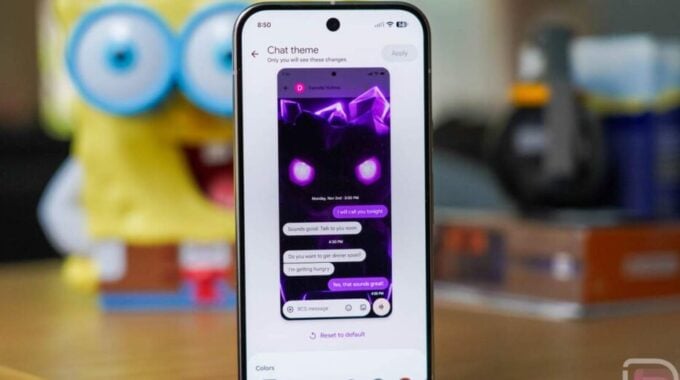
Google took so long with this that people basically forgot it was coming. But here we are. Chat Themes in Google Messages are officially live, and for once, the feature actually does what it says on the tin.
As reported by Droid Life, Google has been slowly rolling Chat Themes out over the past few months, pulling them back at times, and pushing them through again. Classic Google behavior. But the feature is now confirmed through an official community post, which means this is the real deal and not another half-baked server-side test that disappears overnight.
So what do you actually get? Chat Themes let you customize the bubble colors and backgrounds inside individual conversations. You can pick from Google’s curated wallpapers, use your own photos, or choose a solid color. If you go with a photo, the theme can automatically match the color palette to it. That’s a genuinely nice touch, not just a checkbox feature.
One thing worth calling out because people will definitely ask: your theme choices are private. Nobody else in the chat sees them. The customizations live on your device only, which honestly makes the whole thing feel more personal and less like a weird flex on the other person.
There is one catch. Chat Themes only work if you have RCS turned on. No RCS, no themes. That’s been Google’s strategy for a while now, using exclusive features to push people toward RCS adoption. It’s a smart play, even if it locks out anyone still on SMS.
To get started, here’s what you need to do:
- Update Google Messages to the latest version from the Play Store
- Open a conversation you want to customize
- Tap the three-dot menu in the top right and look for ‘Chat theme’
- If it’s missing, force close the app and reopen it
- Once inside the Chat Theme menu, pick a color, a preset image, or your own photo
- Tap ‘Apply’ to lock it in
- To undo it, go back to ‘Chat theme’ and hit ‘Reset to default’
This matters more than it might seem at first glance. Google Messages has spent years playing catch-up to iMessage and WhatsApp on the personalization front. Themes are table stakes on competing platforms, so seeing them land properly here is Google ticking off a box that should have been checked a long time ago. Still, better late than never. The app is in a much stronger place now than it was two years ago, and features like this keep users from jumping ship.