
As an Android user, one becomes somewhat accustomed to broken apps, or just having random little things going wonky from time to time. Yeah, laugh it up, iOS users. Nonetheless, if the application is something you use everyday, like Gmail, it can be almost infuriating if it doesn’t work properly. It is a Google app, after all, and you’d imagine that big G puts a lot of work in to their Android apps. This is true, but that doesn’t make them perfect. Take Gmail for example – it doesn’t always send your emails.
I’ve been visiting family for the past ten days for the Thanksgiving holiday, and have been constantly on the go and not around a computer. This required that I rely on my G2 for communication, especially via Gmail. While it does a good job most of the time, I have seen the Gmail app sometimes fail to send emails. Over Thanksgiving, when I needed Gmail the most, it completely shit out on me, causing some communication conflicts with my job, and my home.
After replying to an email from a housemate asking when I would be returning, I promptly replied. The next day, I received another email from my housemate asking the same question, only to find out that my reply from the first email had been in my Outbox, and had been “sending” for over a day. It wasn’t until a similar conflict happened with my job, and that’s when I got down right pissed, and seriously began searching for a fix to this issue. Turns out, there are many “fixes” for this particular issue, but only one seemed to work for me.
Some of these methods range from simple and logical to downright ridiculous. After trying out a couple, only to see my emails still sending, one caught my eye that just looked it should have been my first thought in the first place. From what I’ve seen, this issue seems to affect Android 2.2 Froyo users primarily, but I wouldn’t be surprised if others on lower versions of the OS are experiencing this.
If your Gmail application isn’t sending your emails, you may think to uninstall it, only to find out you can’t in any elegant fashion.
So try this very simple way to get your emails sending again:
- Go into Settings>Applications>Manage Applications
- Find Gmail in the list of applications (you may have to press the All tab at the top if you don’t see it)
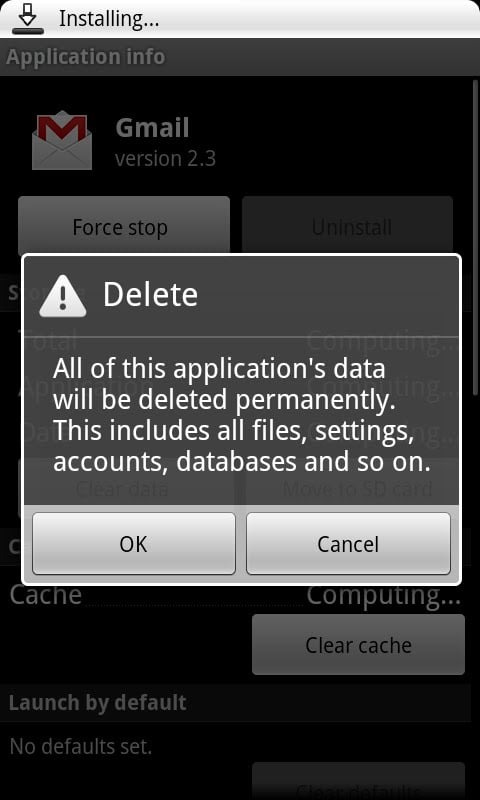
- Clear the application’s Cache and Data. You’ll get the picture above when you try to clear the data, but this will be re-synced later on.
- That’s it. You’ll have to relaunch Gmail and manually re-sync your accounts, but after that, the issue will be solved.
This may save you from yelling some choice words at anyone who crosses you amidst your frustrations.
I didn’t find out how to do this on my own. I found the answer on AndroidForums. Thanks BadBoy!