IntoMobile

Breaking news, information, and analysis on the latest mobile phones and mobile technology

Open NavigationOpen Search
  • Home
  • Platforms
    • iOS / iPhone OS
    • Android
    • Windows Phone
    • BlackBerry OS
  • Hardware
    • New Hardware
    • Tablets
    • Reviews
    • Rumors
  • Carriers
    • AT&T
    • Sprint
    • T-Mobile
    • Verizon
  • Manufacturers
    • Apple
    • Samsung
    • HTC
    • LG
    • Motorola
  • Best VPNs
  • Best AI Tools

How to Setup Email on your iPhone

June 29, 2011 by IntoMobile - Leave a Comment

Share on Twitter Share on Facebook ( 0 shares )

Are you setting up your email accounts on your iPhone for the first time? You can manage multiple email accounts right from your iPhone, giving you access to all of your accounts on the go. Just follow the simple steps below to get started.

Instructions

Difficulty Rating
  • easy
Things you'll need
  • iPhone
  • Compatible email account
  1. Tap Settings.
  2. Tap the Mail, Contacts, Calendars option.
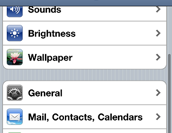
  3. Tap the mail program you use from the list of options.  If you do not see your email provider on the list, not to worry, just tap Other.
  4. Tap Add Mail Account under the Mail field. Note: if you select Other from the email program list, you will need to click Add Mail Account on the the Other screen.

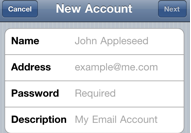
  5. Tap the Name field and enter your name as you would like it to appear on your messages.
  6. Tap the Address field and enter the email address you would like to add.
  7. Tap the Password field and enter the password for the email account you are adding.
  8. Tap the Description field to enter a description for the email address you are adding (for example: Office).
  9. Tap the Next button when complete.  Note: The account will be verified and added to your list of email accounts.  
Share on Twitter Share on Facebook ( 0 shares )

Back to top ▴

Back to top ▴

Follow IntoMobile

38k
36k
4k
13k
12k

Most Recent Posts

  • Vivo X500 specs leak reveals Dimensity 9500 chip and massive 7,500mAh battery
  • AT&T launches $3 unlimited iPad data passes for short-term use
  • Honor introduces virtual permissions to shield user data from apps
  • Realme P4R arrives in India with massive 8,000mAh battery and 144Hz display
  • Samsung plans to expand Exynos chips to more devices in 2027

Get Updates Via E-Mail

  • This field is for validation purposes and should be left unchanged.

About IntoMobile

  • About IntoMobile
  • Contact IntoMobile
  • Send us News Tips
  • Privacy Policy

Social Links

  • IntoMobile on Facebook
  • IntoMobile on Twitter
  • IntoMobile on Google+
  • IntoMobile on YouTube

Copyright © 2006-2021 IntoMobile. All rights reserved.