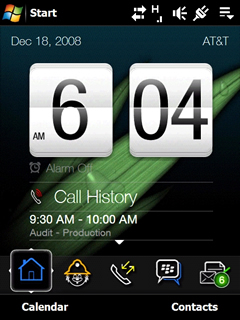
TouchFLO 3D running the FuzeBerry skin - Notice the BlackBerry icons and wallpaper image
Windows Mobile hasn’t seen a more intuitive and sleekly designed user interface since HTC launched their TouchFLO 3D UI. The TouchFLO 3D interface rides on top of the Windows Mobile platform, optimizing it for finger-based inputs. And, it doesn’t hurt that TouchFLO 3D is easy on the eyes.
TouchFLO 3D is about as good as it gets for Windows Mobile touchscreen interface, but there’s always room for improvement.
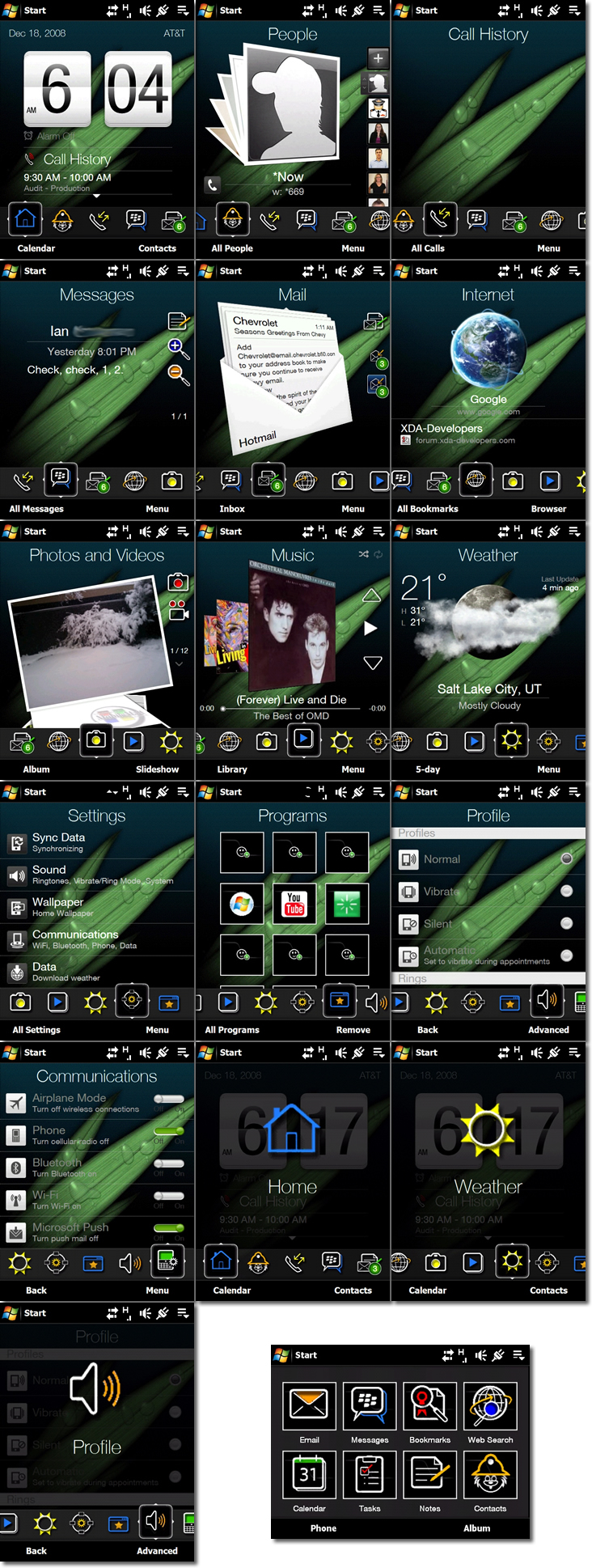
A new TouchFLO 3D skin allows TouchFLO 3D fans to change the look of their TouchFLO 3D UI. The new skin, from MobileMatt.net, allows the user to customize the wallpaper and uses BlackBerry-esque icons. The TouchFLO 3D skin, dubbed FuzeBerry for it’s ability to bring a taste of BlackBerry design to the AT&T Fuze (AT&T’s version of the HTC Touch Pro), also adds a Calendar, Call History, and Comm Manager Tab in to the mix.
For those of you looking to spice up your TouchFLO 3D interface, FuzeBerry might be worth your consideration.
Installation is a simple matter of downloading the .cab file, disabling TouchFLO 3D, and installing the skin:
- Download FuzeBerry skin here
- Extract CAB file
- Copy CAB File to device
- Disable TF3D in Settings – Start > Settings > Today > Items
- Install CAB file to device (do not install to storage card)
- Re-enable TF3D
- Go to TF3D Setting tab
- Tap wallpaper
- Select wallpaper from device (CAB file will install intended wallpaper)
- Skin will accept any wallpaper and show in every tab
- Enjoy your new skin
Jump the break for more pictures of the FuzeBerry skin in action!
[Via: MobileMatt]