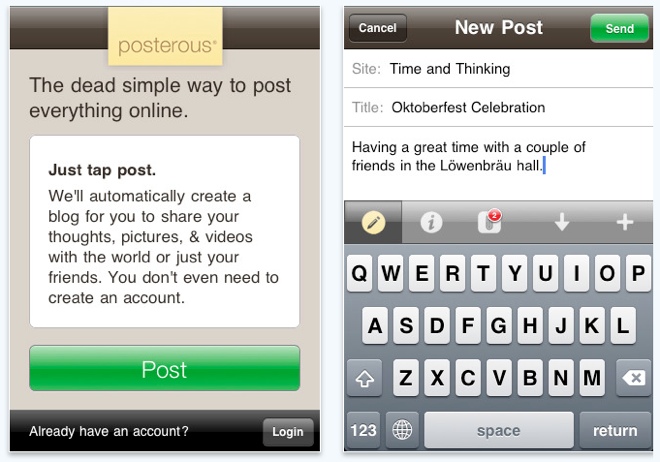

Posterous’ official app for the iPhone is now available in the App store. For those not familiar with Posterous, it is a blogging service that is meant to be easy to use and achieves this convenience by letting you manage many aspects of a blog via email. You can create posts, send images, embed videos, and even start a new blog by sending an email to the post@posterous.com email address. Posterous also serves as the hub of your online social presence with its autopost feature that publishes your content to services like Twitter, Facebook, Flickr, Vimeo, and more.
Previously, mobile management of your Posterous-hosted blog was accomplished via email. You created posts by sending text and media content to your blog via SMTP. The recently released iPhone application changes all that and allows you to manage your blog(s) within an application interface. The blogging service did it right as the iPhone app has a nice looking interface that is drop-dead easy to use.
You can manage several Posterous blogs from the main screen of the application and create and delete posts for each one. If you are in a hurry, you can create a post with just a few quick clicks. In addition to text, the app also supports image and video uploads so you can add your favorite photos and videos on the fly. If you have the autopost feature enabled on your account, any post you publish will also be posted to Twitter, Facebook, Vimeo, Flickr, and more. Cross-posting at its best.
While the Ui for the app is simple yet powerful, a glaring omission is the inability to edit a post. You can create a post and delete a post but you can not edit a post. If you make a mistake and want to fix it, you are out of luck if you are using the iPhone app. To make any quick fixes, you must login into the Posterous website using the browser on your phone, an often cumbersome and frustrating experience.
Despite this limitation, the new iOS app is a must-have for Posterous fans. For those that have a Posterous account or are interested in starting an account, the new application is available from iTunes for free. Additional details and the download link are available here. Enjoy!
[Via TechCrunch and iTunes]