The Motorola (NYSE: MOT) droid launched rolling large with Android 2.0, but for those with older Android devices, you can shelf away your jealousy; the biggest feature, voice-prompted driving directions in Google Maps, is now available on all Android 1.6 devices. Aside from a nice robot lady telling you when to turn, you can also set shortcuts for regular destinations, making it even easier to get to where you’re going. The update also includes Layers support, so you can keep an eye on specific points of interest, even when you’re on the way to your destination. The service is technically only available in the U.S, but there are workarounds. The Android 2.0 launch was hard enough on TomTom and Garmin, who make their business with premium versions of this service; I wonder how they’ll recover from this blow…
Latitude, a Google (NSDQ: GOOG) service built into Maps for Mobile for sharing your location with trusted friends, just got two big updates. First up is location history, which, when enabled, will allow you to see where you were at specific times on desktop Google Maps, and follow your tracks sequentially. This seems like it could be very handy when trying to retrace steps from a hazy Friday night, seeing where you took a wrong turn, or any number of other scenarios. I’d really like to be able to slap on a Panoramio layer on top of that so I could see where geotagged pictures sit in the larger scheme of a trip. The other update is Location Alerts, which pings you via e-mail or SMS whenever someone on your Latitude list is nearby – very helpful for impromptu meetups, but depends on having a well-populated friends list. It certainly saves the hassle of actually opening up Google Maps and navigating to Latitude to see who’s usefully nearby. To get started with Location History, head on over here to enable it on your Google account, or over here for Location Alerts.
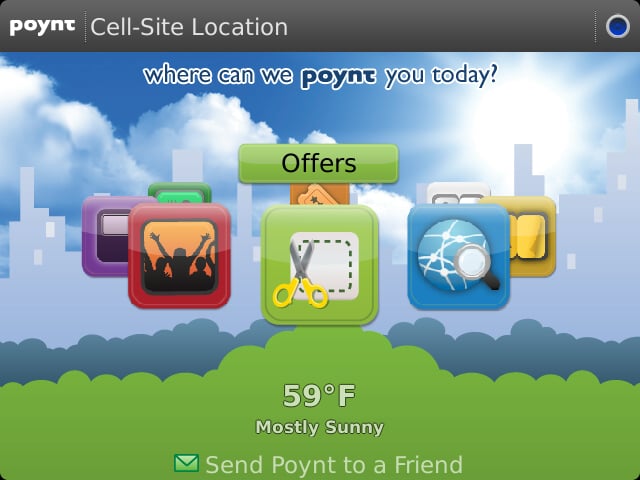
More goodies from the BlackBerry (NSDQ: RIMM) Developer Conference today: fresh location-detection options using cell site recognition, and push services for those who want to leverage RIM’s biggest advantage in mobile computing. First up, cell site recognition is a big one for location-based apps who want to keep battery drain down (GPS takes a significant toll). Anyone with 5.0 will automatically update the database of cell towers and their locations; a very cool use of crowdsourcing. There’s also new reverse geocoding that will tag specific coordinates with a proper street address – a nice addition that we’re already seeing in action in Google (NSDQ: GOOG) Maps for Mobile. On top of those two, RIM has introduced an API for estimated travel time within the U.S. and Canada; the time is generated based on aggregated traffic conditions and speed limits cross-referenced with distance.
Good stuff all around, but push services are probably bigger news for most developers. Push Services will enable apps to pull down up to 8 KB of data with all of the righteous immediacy that makes BlackBerry e-mail oh-so-very awesome. It’ll be interesting to see how this service will fare once it’s out in the wild and what developers use it for (push Twitter, anyone?); Web Signals have been testing the waters for a little bit with Alliance Members, but we’ll have to wait to see how much apps can really do with 8 KB. An added bonus, for devs who thought they might have to pay for it, is that Push Services will be available for free.
Both the new geolocation and push services are available specifically in devices with OS 5.0 and up, and will be available in the first half of 2010. You can try out some of these new options in the beta 5 Java Development Environment that was just released today. For more information on the upcoming push service, check out RIM’s page.
I’ve always been a huge fan of geotagging pictures – it gives immediate context to memorable snapshots, and when you’re travelling, it can be really hard remembering where exactly each one was taken. Although I’m glad that my BlackBerry (NSDQ: RIMM) natively geotags pictures, the data is buried in its EXIF data, which is only preserved if you got through arduous sideloading onto PC, and then uploading to your web service (GPSed is the only app that I’ve seen that makes pictures easily shareable). Luckily for iPhone users, Google (NSDQ: GOOG)’s location-aware picture-sharing service, Panoramio, now has an app for iPhone that lets you share geotagged pictures over the air. After that, folks on Google Maps and Earth will be able to see your pictures once they’re approved. It would be cool if it all synced up with your Picasa account, but its relationship with Panoramio is still hazy. With an army of iPhone users sharing pictures to Google Maps, I could see Panoramio quickly becoming as useful as Street View. Interested? Grab Panoramio for free from the iTunes App Store.
Buzzd, a great little Digg-style location-conscious mobile application for venues and events, has found its way to the iPhone. Buzzd lets you rate up, rate down, comment and upload pictures on where you’re spending your nightlife. By plugging into the GPS, you can quickly find out what’s happening in your vicinity, and local search helps you find just the right place. I tried the BlackBerry (NSDQ: RIMM) version for a little while, and I found that a lot depends on there being an active community submitting ratings, and since it was still relatively new to Canada (not to mention the fact that Ottawa is pretty quiet to begin with), there wasn’t much to run with However, if you’re in a big metropolitain area, go ahead and download it for free from the iTunes App Store.
The Windows Mobile Google application just got a modest update that includes a few handy new features. For one, it’s incorporating cell tower ID recognition to help provide local search results without needing a GPS fix. The technique, dubbed My Location by Google (NSDQ: GOOG), has been on BlackBerry’s search app since March, and is also available in Google Maps. Typing in a search query in the updated WinMo app will now offer suggestions as you type, potentially saving you some time. Finally, the Maps app now integrates with search – just pick the results with a red pin to open the target in Google Maps. To get started or update your current software, hit up m.google.com in your mobile browser.
Travel application WorldMate Live has updated to version 3.0, boasting new browsability of user-generated reviews from Yelp, along with a few improvements to their calendar sync and hotel booking functions. Honest reviews are great to have when you’re in an unfamiliar city; sure a quick Google (NSDQ: GOOG) search can point you to a store or restaurant, but it would certainly be nice if to know beforehand if you’re wasting your time going there. WorldMate Live has a bunch of other great features, including flight status lookups, a time zone calculator, Outlook integration, and a whole lot more. The 3.0 update is only for BlackBerry (NSDQ: RIMM), but they’ve got version for iPhone, Symbian, and Windows Mobile as well. Most of the features are available for free, with a few locked away for Gold subscribers. For more info, visit WorldMate Live, or go ahead and pick it up in the BlackBerry App World.
Brightkite is a location-aware social networking app for Android, iPhone, and now BlackBerry (NSDQ: RIMM) that lets you share photos and notes at certain GPS coordinates both with your friends and to the community at large. Using the service requires you to occasionally “check in”, which might be a pain for those who are used to automated location sharing like we see in Google (NSDQ: GOOG) Latitude, but it does open the doors to those who don’t have integrated GPS in their phone. The interesting thing about the BlackBerry app in particular is that it was built by a third party using open APIs, basically making myKite a homebrew job with an official seal of approval; good on Brightkite for supporting the developer community like that. Interested? Give it a try for free in the BlackBery App World.
I popped my head into the live stream of the TechCrunch 50 to hear about a really great app for iPhone, Android, BlackBerry (NSDQ: RIMM), and soon the Palm (NSDQ: PALM) Pre, that allows you to send geotagged pictures of problems around town (graffiti, potholes, etc.) and send them right to city hall. Cities can view the complaints with picture and text on Google (NSDQ: GOOG) Maps in order to analyze trends and sent to the appropriate department for action. Kevin Rose suggested a Digg-style rating system to prioritize existing problems, which makes really good sense. Take a look at the video for the full pitch – it’s worth watching the end when the developer gets razzed for supporting the Pre because Palm invested in them. If you want to get involved, you can contact the developers on info@citysourced.com
After looking into the new Yelp apps for the iPhone and Palm Pre, it turns out a BlackBerry (NSDQ: RIMM) version was churned out recently as well. While not quite as snazzy as the iPhone’s augmented reality angle, the BlackBerry app should offer all the same points of interest reviews you need while on the move. GPS integration lets you automate the searching process a bit, but even if you don’t have GPS (like I do currently on the BlackBerry 8520), you can always input your location manually. I was initially really excited to see the app, but unfortunately you can’t write reviews from your device, which strikes me as the best way to do it – right there, while you’re at the restaurant/store/club/whatever and are able to take and upload pictures right from the floor. Ah well, maybe in a later version. Yelp for BlackBerry is available in the U.S., Canada, UK and Ireland – just head on over to yelp.com on your mobile browser to get downloading. I’d really like to see this in App World soon, mostly for the handy microSD archiving feature.