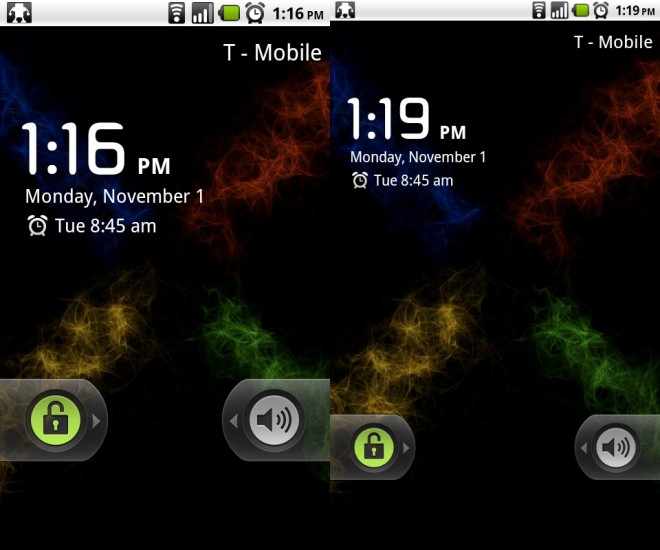

Do you have a rooted Android phone and need just one more aspect of your smartphone to tinker with? We suggest you check out LCD Density Changer that gives your phone a high-resolution screen effect with a simple software tweak. .
The application needs root to operate, and basically looks like what you’d see when change the monitor resolution of a computer. Some will see this tweak as useless, but there’s definitely something about it that makes the OS look a little nicer. Those who use certain home replacement applications like ADW Launcher may see the most benefit with the app, as you can modify the amount of columns and rows available on the homescreen, and changing the density would make it look less cramped.
If you’re already rooted, all you need to do is launch the application, and give it a number to change the density to. The sweet spot is definitely around 200, but you can pick and choose a setting that suits you best. Once you have chosen your desired density number, save it, and hit Preview/Temp. Change. The device will then do a “Hot Reboot”, and your phone will then appear with the new screen density. If you’re running the temp-root on the G2, don’t expect this to stick around, but it’s easy enough to redo.
There are some issue concerning compatibility with some widgets, but I have yet to experience any issues yet. Beautiful Widgets was named as one such widget, but it renders perfectly for me, but other handset may experience some bugs.
So if you’d like some more space to work with on ADW Launcher, or you just like the way it looks, head over to the Android Market and Search for LCD Density Changer. There is another application available for free, but the paid version is coming to us by the same team who gave us the Hot Reboot app, so show them some love, won’t you? It’s only $1.04, so it won’t be breaking the bank.
Keep in mind, if you are already straining your eyes on your standard homescreen, using LCD Density Changer will likely give you little more than headaches.
If you’ve used this before, how do you like it? Any issues?


[Via: XDA-Developers]