IntoMobile

Breaking news, information, and analysis on the latest mobile phones and mobile technology

Open NavigationOpen Search
  • Home
  • Platforms
    • iOS / iPhone OS
    • Android
    • Windows Phone
    • BlackBerry OS
  • Hardware
    • New Hardware
    • Tablets
    • Reviews
    • Rumors
  • Carriers
    • AT&T
    • Sprint
    • T-Mobile
    • Verizon
  • Manufacturers
    • Apple
    • Samsung
    • HTC
    • LG
    • Motorola
  • Best VPNs
  • Best AI Tools

How To Share Photos on Your iPhone Running iOS 7

November 5, 2013 by Ian Kersey - Leave a Comment

Share on Twitter Share on Facebook ( 0 shares )

With Apple’s recent iOS 7 update, you may be a little confused as how some of the new features work. Don’t worry, we’re here for you! In this post, we will step you through the process of sharing those photos on your iPhone using Apple’s iCloud service.

iCloud photo sharing is simple, and allows you to share those precious moments with friends and family. Ready? Good! Just follow the steps below.

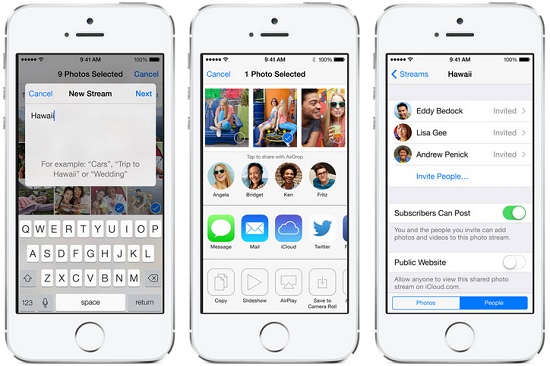
Create a shared stream

1.  While in the Shared Streams view, simply tap the + key.

2.  Name the stream, the simpler the better.

3.  Invite people to share your stream with.

4.  Add photos and videos that you wish to add to your stream.

And there you go! Share away!

[Via: Apple]

Share on Twitter Share on Facebook ( 0 shares )

Back to top ▴

Back to top ▴

Follow IntoMobile

38k
36k
4k
13k
12k

Most Recent Posts

  • TSMC is already moving to 1.6nm while everyone else is still waiting for 2nm
  • Poco M8x 5G is coming to India, and it wants to own the budget 5G space
  • Infinix Hot 70 Pro is coming to India in early September
  • Nothing OS 5.0 is dropping August 25, and it looks like their best update yet
  • Poco F9 Ultra specs and pricing leak ahead of official launch

Get Updates Via E-Mail

  • This field is for validation purposes and should be left unchanged.

About IntoMobile

  • About IntoMobile
  • Contact IntoMobile
  • Send us News Tips
  • Privacy Policy

Social Links

  • IntoMobile on Facebook
  • IntoMobile on Twitter
  • IntoMobile on Google+
  • IntoMobile on YouTube

Copyright © 2006-2021 IntoMobile. All rights reserved.