IntoMobile

Breaking news, information, and analysis on the latest mobile phones and mobile technology

Open NavigationOpen Search
  • Home
  • Platforms
    • iOS / iPhone OS
    • Android
    • Windows Phone
    • BlackBerry OS
  • Hardware
    • New Hardware
    • Tablets
    • Reviews
    • Rumors
  • Carriers
    • AT&T
    • Sprint
    • T-Mobile
    • Verizon
  • Manufacturers
    • Apple
    • Samsung
    • HTC
    • LG
    • Motorola
  • Best VPNs
  • Best AI Tools

Here’s how to get the new Google Now launcher on any Android phone (or tablet)

February 28, 2014 by Dusan Belic - 5 Comments

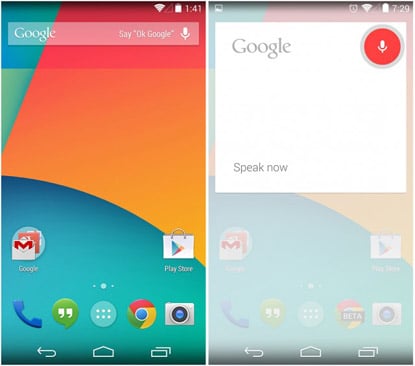
Google Now launcher
Share on Twitter Share on Facebook ( 0 shares )

We’ve told you that Google Now launcher has been released in the Play Store though at the moment only Nexus users can get it. That, at least, is Google’s official pitch – cause everyone can install it with just a little work needed.

  • First thing, you’ll need the latest version of Google Search installed on your smartphone.
  • Then, you’ll need to download and sideload the Google Now launcher APK. You can grab that file from here.
  • Install that APK and you’re good to go. Now just say “OK, Google” and take it from there.

Perhaps your default launcher or custom software may interfere with this, we can’t really tell. But, you can always uninstall Google’s launcher if you don’t like it. 😉

[Via: PhoneArena]

Share on Twitter Share on Facebook ( 0 shares )

Back to top ▴

Back to top ▴

Follow IntoMobile

38k
36k
4k
13k
12k

Most Recent Posts

  • NTT Docomo shuts down i-Mode service that created the global emoji language
  • Samsung Galaxy’s ocean conservation feature wins international sustainability awards
  • Smartphone cameras might be entering a new stage of development
  • Your old smartphone could be a fire risk hiding in plain sight
  • India-made smartphone shipments climb 8% in 2025 as export boom drives growth

Get Updates Via E-Mail

  • This field is for validation purposes and should be left unchanged.

About IntoMobile

  • About IntoMobile
  • Contact IntoMobile
  • Send us News Tips
  • Privacy Policy

Social Links

  • IntoMobile on Facebook
  • IntoMobile on Twitter
  • IntoMobile on Google+
  • IntoMobile on YouTube

Copyright © 2006-2021 IntoMobile. All rights reserved.