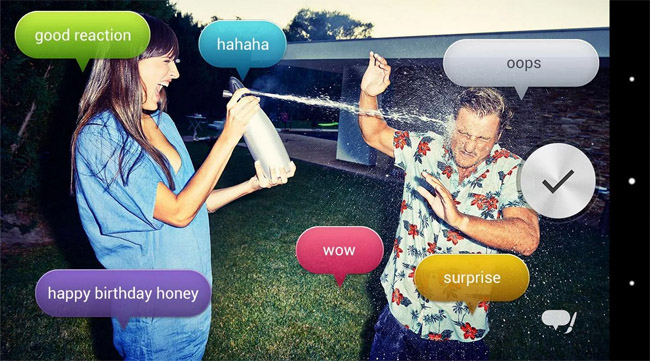
Sony has launched a new Android app for select Xperia smartphones – Voice Balloon Photo, which won’t make your photos better but could make them more entertaining. The application will not only capture a photo but also voices around you and turn them into speech bubbles in real-time. Pretty neat and, of course, if the text-to-speech algorithm fails you, there’s an option to manually override the text with a phrase of your own. Or completely delete it, whatever works for you best.
Here’s how to use Voice Balloon Photos:
- Start Camera and select Voice Balloon Photos.
- Let it recognize voices around you so that speech balloons can be populated with words.
- Tap the camera key to take photos with displayed speech balloons.
- Now you can move the speech balloons, change the theme and/or change the text inside balloons.
- Tap the save button.
That’s it. You just got yourself a nice, sharable photo.
It’s unclear which Xperia smartphones are supported but we do know not all of them will work. I would assume all models in the Xperia Z series will do, though.
Voice Balloon Photo (FREE) [Google Play Store]