IntoMobile

Breaking news, information, and analysis on the latest mobile phones and mobile technology

Open NavigationOpen Search
  • Home
  • Platforms
    • iOS / iPhone OS
    • Android
    • Windows Phone
    • BlackBerry OS
  • Hardware
    • New Hardware
    • Tablets
    • Reviews
    • Rumors
  • Carriers
    • AT&T
    • Sprint
    • T-Mobile
    • Verizon
  • Manufacturers
    • Apple
    • Samsung
    • HTC
    • LG
    • Motorola
  • Best VPNs
  • Best AI Tools

Google TV Remote App Comes to iOS

March 14, 2013 by Ian Kersey - 1 Comment

Share on Twitter Share on Facebook ( 0 shares )

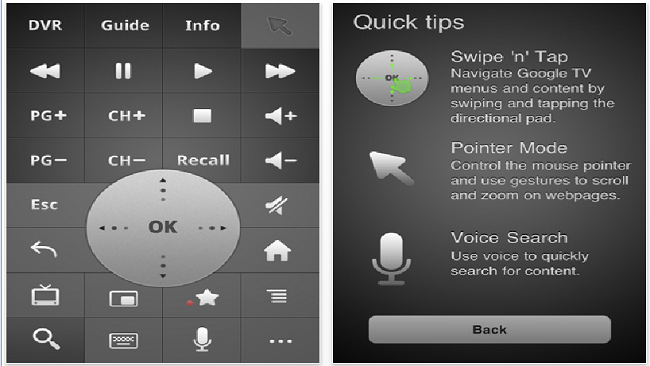
If you are an iPhone user who currently is in possession of a Google TV, you can now say goodbye to traditional remotes. Google has released its Google TV Remote app for iOS, giving iPhone users an experience that once was limited to Android owners.

The app features a mouse pad, arrow keys and a full range of the usual buttons. It allows users to turn the TV and AVR off and on, which lets them use their device as the primary remote. The app provides a voice search function, which opens up a whole new way to find your favorite programming.

Once you’ve downloaded the app, simply connect to the same wireless network as your Google TV, launch the Google TV Remote app and you’re set.

Head here to download the app. Sorry international users, the app is only available in the U.S for now.

[Via: Razorianfly]

Share on Twitter Share on Facebook ( 0 shares )

Back to top ▴

Back to top ▴

Follow IntoMobile

38k
36k
4k
13k
12k

Most Recent Posts

  • Chrome brings smarter autofill to iOS and Android through Google Wallet
  • Honor is testing hardware-level privacy screen tech for its next flagship
  • Samsung Galaxy Z Flip 8, Fold 8, and Fold 8 Ultra: every color and storage option leaked
  • Samsung Galaxy M47 launches June 29 with Snapdragon chip and six years of updates
  • Meta launches its own glasses line starting at $299, powered by its latest AI model

Get Updates Via E-Mail

  • This field is for validation purposes and should be left unchanged.

About IntoMobile

  • About IntoMobile
  • Contact IntoMobile
  • Send us News Tips
  • Privacy Policy

Social Links

  • IntoMobile on Facebook
  • IntoMobile on Twitter
  • IntoMobile on Google+
  • IntoMobile on YouTube

Copyright © 2006-2021 IntoMobile. All rights reserved.